Swift 3D Version 5
3 dimensional vector graphics tool

เป็นโปรแกรมที่ช่วยให้คุณสร้างงานสามมิติ
ให้โลดแล่นบนอินเตอร์เน็ตได้อย่างสวยงาม
หรือจะใช้ประกอบกับงานด้านมัลติมีเดีย
ในการนำเสนองาน ด้วยโปรแกรม Flash


  Papervision3D Export

Papervision3D Export
Swift 3D now exports to the popular Papervision3D format and automatically generates all of the actionscripting required for rotation and zooming mouse interactions in Flash. You don't have to write a line of code...unless you want to.

  Import and Render Transparent Textures

Import and Render Transparent Textures
Create bitmap materials with transparency and Swift 3D will respect that transparency when rendering. Transparent textures also work with the Papervision3D and 3DS export. Swift 3D also renders refraction based on your settings.

Orthographic Views

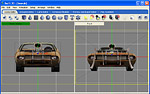
Orthographic Views
Makes modeling a snap. Orthographic views take away the camera perspective that makes the task of lining up objects difficult. Quickly and easily toggle in and out of Orthographic View mode to improve the modeling workflow.

Mesh Morphing Animations

Mesh Morphing Animations
Swift 3D V5 allows you to morph the underlying 3D mesh of your objects. Morph Targets act as starting, ending, and interim points for changes in shape to your 3D objects, allowing you to easily create these mesh transformations.

Enhanced User Interface

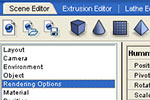
Enhanced User Interface
After more than five years, it was time to give Swift 3D the facelift it deserved. The sleek new interface not only looks great, but is more functional and includes many of the usability enhancements our customers have requested throughout the years.

Per Object Fill Rendering

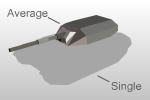
Per Object Fill Rendering
Now, with a single pass of the RAViX 4 rendering engine, you can output as many different looks and styles as you want on each object in your 3D scene. Styles applied to objects in the Scene Editor override the settings used in the Preview and Export Editor.

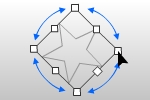
Extrusion / Lathe Free Transform

Extrusion / Lathe Free Transform
Sometimes it’s the little things that make big impacts on workflow and efficiency. A 2D drawing editor isn’t complete without the ability to free transform the shapes. Swift 3D V5 provides the missing tool from previous versions and improves workflow in both the extrusion and lathe editing environments.

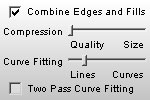
Built-in Optimization

Built-in Optimization
Our RAViX vector rendering technology has always produced clean and compact Flash files. Swift 3D Version 5 adds a user-controlled post-render process utilizing slider controls that allow you to further reduce file sizes by 50% or more!

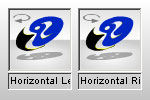
Drag / Drop Animation Visuals

Drag / Drop Animation Visuals
Sometimes an animation name just isn’t good enough. Our new drag and drop animation visuals give you an at-a-glance view of pre-defined animation paths and rotations. A mouse click on the preview presents an example of the animation to be applied.

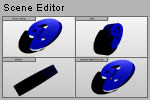
Viewport Consistency

Viewport Consistency
Swift 3D’s Scene Editor now features a 4-viewport layout, making modeling and animation within this environment even easier. This, along with improvements in object selection and standardization of sizing between editing environments give a much improved experience when working between editing environments.

Undo Restructuring

Undo Restructuring
One epic improvement to Swift 3D that you won’t even know is there until you need it is a completely revamped undo system. Version 5 now provides unlimited undo operations across editing environments to help get you back to your happy place.

HTML /w SWF Export

HTML /w SWF Export
Swift 3D V5 provides a new output option that embeds your SWF into an HTML page. It’s a quick and easy way to get your work onto the web without the use of other HTML editors.

.Export to XAML for WPF and Silverlight

Export to XAML for WPF and Silverlight
Swift 3D Exports frame-by-frame animation in XAML format, which is the language the Silverlight Player understands. These XAML files can also be used in Microsoft Expression Blend, as a design element of a larger Silverlight Project.

3ds Export

3ds Export
Swift 3D now allows you to export your 3D models and scenes to the .3ds format for use in other 3D programs that support this industry standard file format. All materials, lighting, and animation are exported. This new functionality also allows tight integration with Adobe Photoshop CS Extended.


System Requirements:
Windows Macintosh
  • Windows 98, NT, 2K, XP, Vista
  • Min: 600 Mhz processor
  • Rec: 1.2 Ghz processor
  • Min: 128 MB RAM (256 MB for XP, Vista)
  • Rec: 512 MB RAM
  • 25 MB available disk space
  • 1024 x 768 monitor resolution
  • Mac OS X 10.2+
  • Min: 400 Mhz processor
  • Rec: 1.0 Ghz processor
  • Min: 128 MB RAM
  • Rec: 512 MB RAM
  • 25 MB available disk space
  • 1024 x 768 monitor resolution
  •  


    สอบถามรายละเอียดเพิ่มเติมได้ที่ บริษัท อีบิซิเน็ต จำกัด
    โทร. 02-6903738-40, 44, 45
    Email : info@ebizinet.com